> ## Documentation Index
> Fetch the complete documentation index at: https://docs.metengine.xyz/llms.txt
> Use this file to discover all available pages before exploring further.
# LP from Anywhere
> Access MetEngine's speed at your fingertips
Trade from your phone, your couch, or on the go. The MetEngine Telegram Bot gives you one-click access to LP positions and copy trading right from trenches.
## What You'll Unlock
* Instant LP positions from any Telegram chat
* Copy trade smart wallets with millisecond precision
* Self-custodial wallet you fully control
* Real-time position monitoring and alerts
## Access the Bot
Open the MetEngine bot to get started:
Open @met\_engine\_bot in Telegram
Tap `/start` to initialize your trading account.
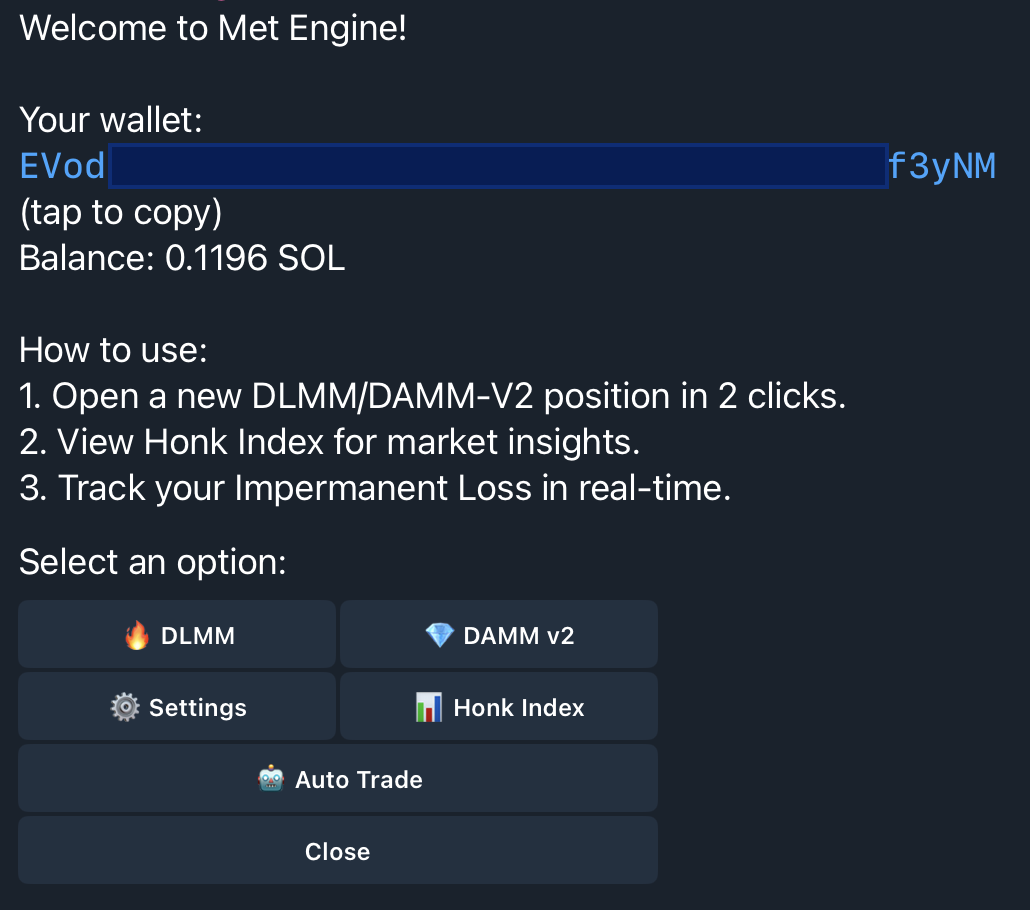 ## Your Telegram Wallet
When you first interact with the bot, it automatically creates a secure trading wallet. This wallet is:
* **Self-custodial**: You own the private keys
* **Exportable**: Transfer to any Solana wallet anytime
* **Ready instantly**: No signup, no email, no KYC
Tap **Wallet** to view your wallet address and balance.
## Your Telegram Wallet
When you first interact with the bot, it automatically creates a secure trading wallet. This wallet is:
* **Self-custodial**: You own the private keys
* **Exportable**: Transfer to any Solana wallet anytime
* **Ready instantly**: No signup, no email, no KYC
Tap **Wallet** to view your wallet address and balance.
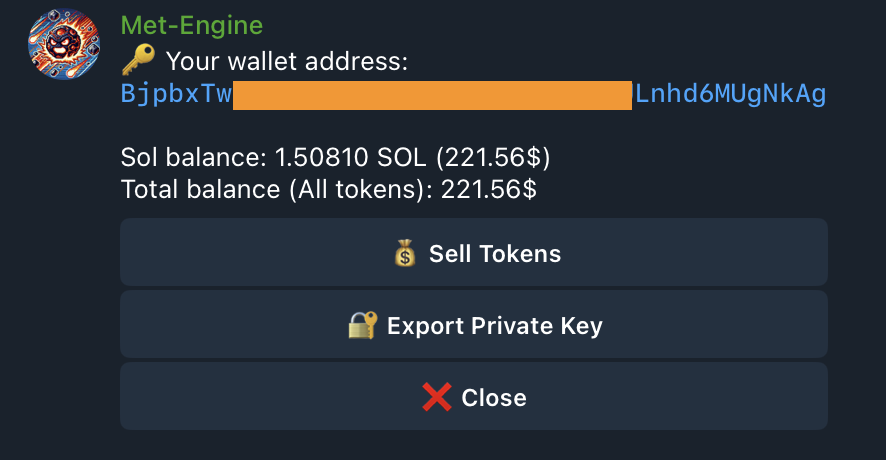 ## Fund Your Wallet
Send SOL to your wallet address to start trading. You'll need:
* **Minimum 0.2 SOL** to open positions
* **Extra buffer** for transaction fees (0.01-0.02 SOL)
Copy your wallet address from the bot and fund some SOL.
## Main Commands
| Command | What It Does |
| ----------------- | ------------------------------------------------ |
| `/start` | Main menu with all features |
| `/wallet` | Manage wallet and swap tokens |
| `/open` | Open a new LP position |
| `/damm` | Set configuration and presets for DAMM quick ape |
| `/dlmm` | Set configuration and presets for DLMM quick ape |
| `/damm_positions` | Track your DAMM positions |
| `/dlmm_positions` | Track your DLMM positions |
## Export Your Private Key
Your wallet is fully self-custodial. To export your private key:
1. Tap **Wallet** from the main menu
2. Tap **Export Private Key**
3. Store it securely—this key controls your funds
You can import this key into Phantom, Solflare, or any Solana wallet.
## Start Trading
Your Telegram wallet is set up. Open your first position or set up copy trading.
One-click LP from Telegram
Copy smart wallets automatically
## Fund Your Wallet
Send SOL to your wallet address to start trading. You'll need:
* **Minimum 0.2 SOL** to open positions
* **Extra buffer** for transaction fees (0.01-0.02 SOL)
Copy your wallet address from the bot and fund some SOL.
## Main Commands
| Command | What It Does |
| ----------------- | ------------------------------------------------ |
| `/start` | Main menu with all features |
| `/wallet` | Manage wallet and swap tokens |
| `/open` | Open a new LP position |
| `/damm` | Set configuration and presets for DAMM quick ape |
| `/dlmm` | Set configuration and presets for DLMM quick ape |
| `/damm_positions` | Track your DAMM positions |
| `/dlmm_positions` | Track your DLMM positions |
## Export Your Private Key
Your wallet is fully self-custodial. To export your private key:
1. Tap **Wallet** from the main menu
2. Tap **Export Private Key**
3. Store it securely—this key controls your funds
You can import this key into Phantom, Solflare, or any Solana wallet.
## Start Trading
Your Telegram wallet is set up. Open your first position or set up copy trading.
One-click LP from Telegram
Copy smart wallets automatically